FlowAWTRIX NG
Spectrum
On an AWTRIX display
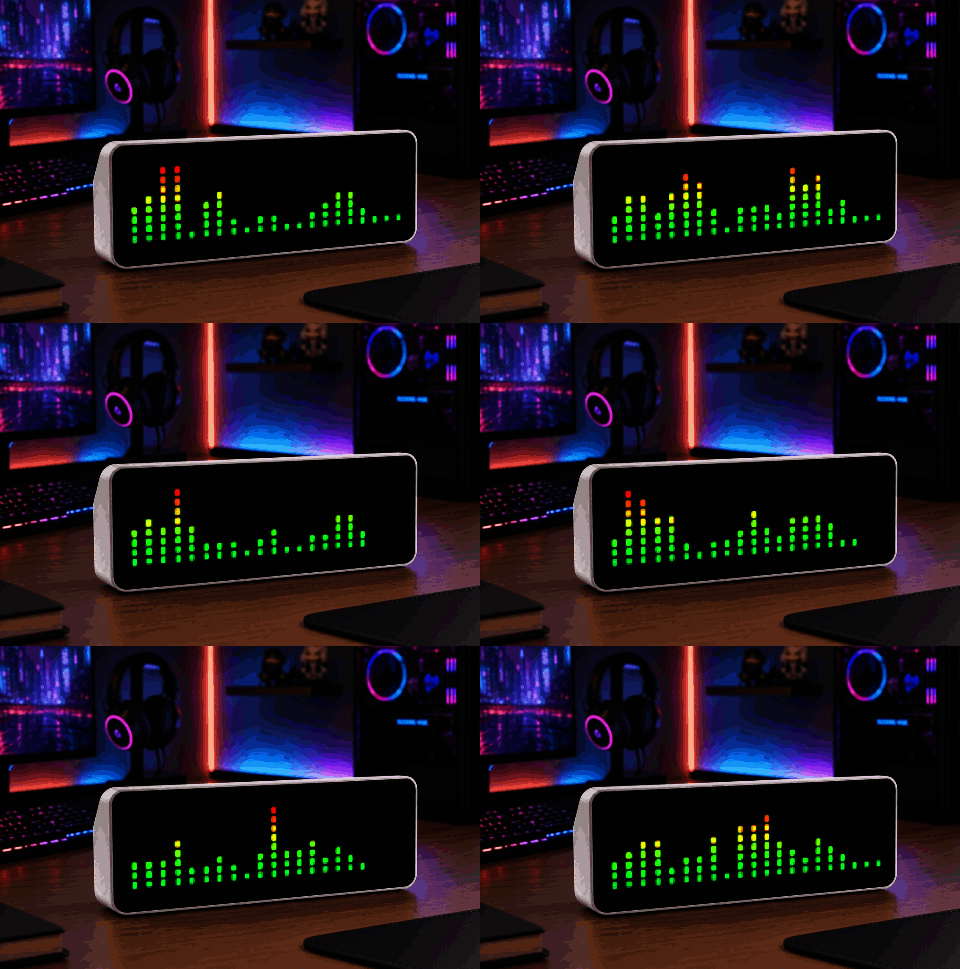
On your display
Spectrum analyser for the music the device is playing
- Works with
- AWTRIX NG
- Topic
- Miscellaneous
- Includes
- Script
Choose your display in the next step.
Flow description
You need a ESP32-S3 with a I2S Audio DAC to use this
9AZhB3aASWVr.ax
# @name Spectrum
# @desc Spectrum analyser for the music the device is playing
# @author Blueforcer
# @version 1.3
# @config palette select "Colours" default=classic options=classic,rainbow,ice,fire,mono
# @config decay number "Bar fall time" default=350 min=100 max=2000 unit=ms
# @config peaks bool "Peak markers" default=false
# @config beat_flash bool "Flash markers on the beat" default=true

class Spectrum
  var n          # bars: one pixel plus one gap each
  var level      # smoothed bar level per bar, 0..255
  var peak       # peak marker per bar, 0..255
  var peak_at    # when the marker was last raised, ms
  var last       # previous frame, ms
  var rows       # colour per row, bottom first
  var decay      # time a full bar needs to drain, ms
  var peaks      # draw the peak markers
  var flash      # markers turn white on the beat

  def init()
    self.n = (width() + 1) / 2
    if self.n > 32 self.n = 32 end
    self.level = []
    self.peak = []
    self.peak_at = []
    for i: 0..self.n - 1
      self.level.push(0)
      self.peak.push(0)
      self.peak_at.push(0)
    end
    self.last = 0
    self.decay = store.get("decay")
    self.peaks = store.get("peaks")
    self.flash = store.get("beat_flash")
    self.rows = self.build_rows(store.get("palette"))
  end

  def build_rows(p)
    if p == "classic"
      return [0x00A83C, 0x18C830, 0x50DC1C, 0x9CE010, 0xE8D000, 0xF09800, 0xF05000, 0xF01800]
    end
    var r = []
    for y: 0..7
      if p == "rainbow"
        r.push(hsv(y * 300 / 7, 100, 70))
      elif p == "ice"
        r.push(hsv(220 - y * 60 / 7, 100 - y * 70 / 7, 45 + y * 55 / 7))
      elif p == "fire"
        r.push(hsv(y * 50 / 7, 100, 40 + y * 60 / 7))
      else
        r.push(hsv(0, 0, 25 + y * 75 / 7))
      end
    end
    return r
  end

  def should_show()
    return music.playing()
  end

  def draw()
    var now = now_ms()
    var dt = self.last > 0 ? now - self.last : 0
    if dt > 100 dt = 100 end
    self.last = now
    var fall = dt * 255 / self.decay
    var drift = dt * 255 / 1200        # a released marker sinks in 1.2 s
    var bands = music.bands(self.n, 255)
    var beat = music.beat() && self.flash
    var h = height()
    for i: 0..self.n - 1
      var lv = self.level[i] - fall
      if bands[i] > lv lv = bands[i] end
      if lv < 0 lv = 0 end
      self.level[i] = lv
      if lv >= self.peak[i]
        self.peak[i] = lv
        self.peak_at[i] = now
      elif now - self.peak_at[i] > 450
        var p = self.peak[i] - drift
        self.peak[i] = p < 0 ? 0 : p
      end
      # Squared, so quiet bands sit low and only the loud ones reach the red rows.
      var x = i * 2
      var bar = (lv * lv / 255 * h + 127) / 255
      for y: 0..bar - 1
        pixel(x, h - 1 - y, self.rows[y < 8 ? y : 7])
      end
      if self.peaks
        var pk = (self.peak[i] * self.peak[i] / 255 * h + 127) / 255
        if pk > 0
          pixel(x, h - pk, beat ? 0xFFFFFF : 0x9098A0)
        end
      end
    end
  end
end

return Spectrum()
Community
Discussion 0
Ask a question, suggest a change or share how you use it.
No comments yet. Start the conversation.
More flows for AWTRIX NG Scripts or Miscellaneous
Something wrong with this flow? Report it.
Have an idea?
Sign in to ask questions and join the conversation.