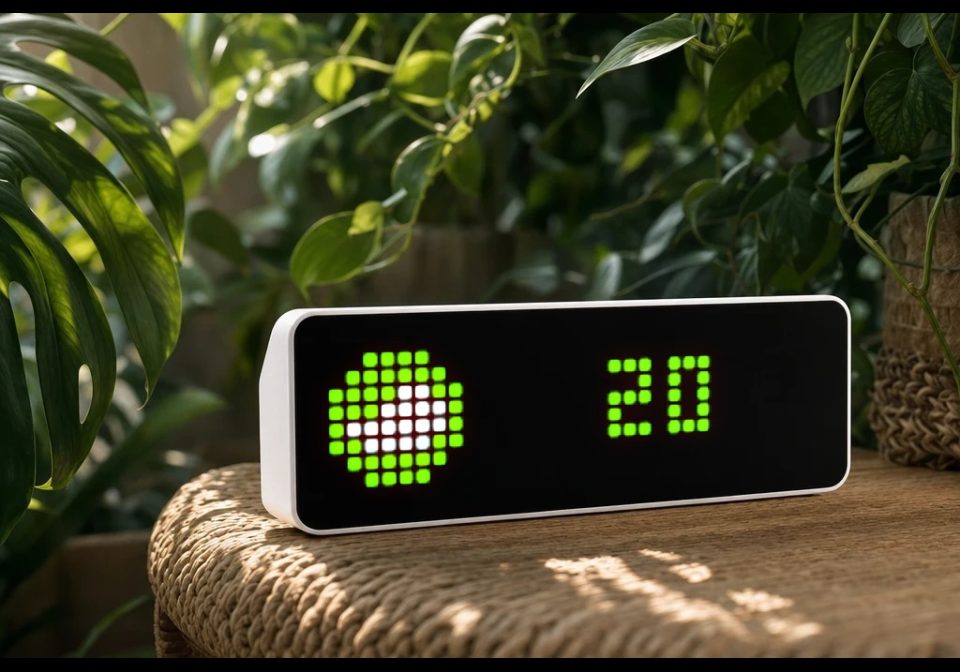
Air Quality (CN)
Current AQI for your city, with the colour and icon of its AQI band — green at 50 and below, shading to purple past 300.
About this flow
| System | AWTRIX NG Scripts |
|---|---|
| AWTRIX version | AWTRIX NG |
| Topic | Smarthome |
| Built by | Golevka2001 |
| File | 7ruuDQPaRgdo.ax · 4.3 KB |
| Icons | 7 |
| Published | 30 Aug 2026 · updated 2 Sep 2026 |
| Downloads | 48 |
Is this your flow?
If you created this flow, open your saved edit link to add it to your account. You can then manage it whenever you sign in. Adding it to your account replaces the edit link.
Flow description
Current AQI for your city, with the colour and icon of its AQI band — green at 50 and below, shading to purple past 300.
Press the select button for an instant refresh.
Setup: get a key at https://tianapi.com — register, activate the 空气质量指数 (air quality index) interface in your console, then copy your API key into settings. Enter the city name in Chinese (南京, 上海).
Heads-up: the Tianapi AQI interface covers mainland China only.
| Setting | Value |
|---|---|
| API Key | Your tianapi.com API key |
| City | Chinese city name, e.g. 南京, 上海 (default 北京) |
| Refresh | Refresh interval in minutes (min 1) |
The six band icons are fixed IDs (47651–47657), not configurable, and must be installed on your device.
Learn more at https://github.com/Golevka2001/awtrix-scripts.
7ruuDQPaRgdo.ax
# @name    Air Quality (CN)
# @desc    AQI for a Chinese city from the Tianapi air quality API
# @author  Golevka2001
# @version 1.0
# @config  api_key  text    "API Key"  help="tianapi.com console"
# @config  area     text    "City"     default="北京"  help="Chinese city name"
# @config  every    number  "Refresh"  default=60  min=1  unit=min

class AirQuality
  # AQI band thresholds with the matching icon and colour (China's standard)
  var levels, url, aqi, label, ic, color, tx, err
  # refresh countdown + failure backoff, see due()/failed()/ok()/now()
  var ticks, span, retry, busy

  def init()
    self.levels = [
      [50, "47651", 0x71D608],
      [100, "47652", 0xFAFF1B],
      [150, "47653", 0xF98718],
      [200, "47654", 0xF70017],
      [300, "47655", 0x8F00FF],
      [-1, "47656", 0x870089],
    ]
    # saving a setting restarts the app, so the URL built here never goes stale
    self.url = ""
    var key = store.get("api_key")
    if key != nil && key != ""
      self.url = "https://apis.tianapi.com/aqi/index?key=" + str(key) +
                 "&area=" + str(store.get("area"))
    end
    self.aqi = nil
    self.label = "--"
    self.ic = "47657"
    self.color = 0x666666
    self.tx = 9
    self.ticks = 0
    self.span = 60
    self.retry = 30
    self.busy = false
    self.err = false
  end

  # first fetch + fill display state before the first frame
  def setup()
    self.loop()
  end

  # select forces a refresh; left and right just rotate
  def on_button(btn)
    if btn == "select"
      self.now()
    end
  end

  def on_body(body, status)
    shared.set("f", 0)
    # non-200 or nil body: nothing usable this attempt
    if status != 200 || body == nil
      self.failed()
      return
    end
    var m = re.search("\"aqi\":\"?(\\d+)", body)
    if m == nil
      self.failed()
      return
    end
    var n = num(m[1])
    if n == nil
      self.failed()
      return
    end
    self.ok()
    self.aqi = n
  end

  def loop()
    # url checked first: due() raises busy as a side effect
    if self.url != "" && self.due(store.get("every"))
      shared.set("f", 1)
      # keep only the 24 bytes after the needle
      http.get(self.url, / b, st -> self.on_body(b, st),
               {'find': "\"aqi\":", 'keep': 24})
    end

    # pick the band, colour and label for the current reading
    if self.aqi != nil
      self.label = str(int(self.aqi))
      var i = 0
      while i < size(self.levels) - 1 && self.levels[i][0] >= 0 &&
            self.aqi > self.levels[i][0]
        i += 1
      end
      self.ic = self.levels[i][1]
      self.color = self.levels[i][2]
    else
      self.label = self.err ? "?" : "--"
      self.color = self.err ? 0xCC7722 : 0x666666
    end
    self.tx = 9 + int((width() - 9 - text_ink_width(self.label)) / 2)
  end

  # Fires at most once per interval, never while a request is out or another
  # app's TLS handshake is running (shared "f" flag, official convention).
  # Raises busy, so only call it when a request will actually be issued.
  def due(every)
    self.span = max(60, num(every, 1) * 60)
    if self.ticks > 0
      self.ticks = self.ticks - 1
      return false
    end
    if self.busy
      return false
    end
    for k : shared.keys()
      var n = size(k)
      if n > 2 && k[n - 2 .. n - 1] == ".f" && shared.get(k) == 1
        var a = shared.age(k)
        if a != nil && a < 20000
          return false
        end
      end
    end
    self.ticks = self.span
    self.busy = true
    return true
  end

  # failure backoff: retry at 30s, doubling, capped at the interval; raises
  # err so a fetch with no data yet can show "?" instead of "..."
  def failed()
    self.busy = false
    self.ticks = self.retry
    self.retry = min(self.retry * 2, self.span)
    self.err = true
  end

  def ok()
    self.busy = false
    self.retry = 30
    self.err = false
  end

  # manual refresh: clears the countdown but leaves busy alone, so a press
  # while a request is out can't fire a second one
  def now()
    self.ticks = 0
    self.retry = 30
  end

  def draw()
    clear()
    if !icon(self.ic, 0, 0)
      rect_fill(0, 0, 8, 8, 0x222222)
    end
    text(self.tx, 6, self.label, self.color)
  end
end

return AirQuality()
Install it on your AWTRIX NG
Add this flow to your AWTRIX NG. It will start appearing on your display after installation.
Unable to connect? Download the flow and add it in the Scripts section of your AWTRIX. Advanced users can also use this command:
This flow uses the following icons. Add them to your AWTRIX along with the flow.

8×8 px

8×8 px

8×8 px

8×8 px

8×8 px

8×8 px

8×8 px
Sign in to download these icons or send them to your AWTRIX.
Discussion 0
Ask a question, suggest a change or share how you use it.
No comments yet. Start the conversation.
More flows for AWTRIX NG Scripts or Smarthome
Something wrong with this flow? Report it.
Have an idea?
Sign in to ask questions and join the conversation.