Battery Monitor
Automation Blueprint to monitor/display battery status of a device such as a phone.
About this flow
| System | Home Assistant Blueprint |
|---|---|
| AWTRIX version | AWTRIX 3 |
| Topic | Smarthome |
| Built by | jeeftor |
| File | 6wqGQAmP5pe0.yaml · 4.2 KB |
| Icons | 10 |
| Published | 16 May 2023 · updated 9 Jun 2023 |
| Downloads | 68 |
Is this your flow?
If you created this flow, open your saved edit link to add it to your account. You can then manage it whenever you sign in. Adding it to your account replaces the edit link.
Flow description
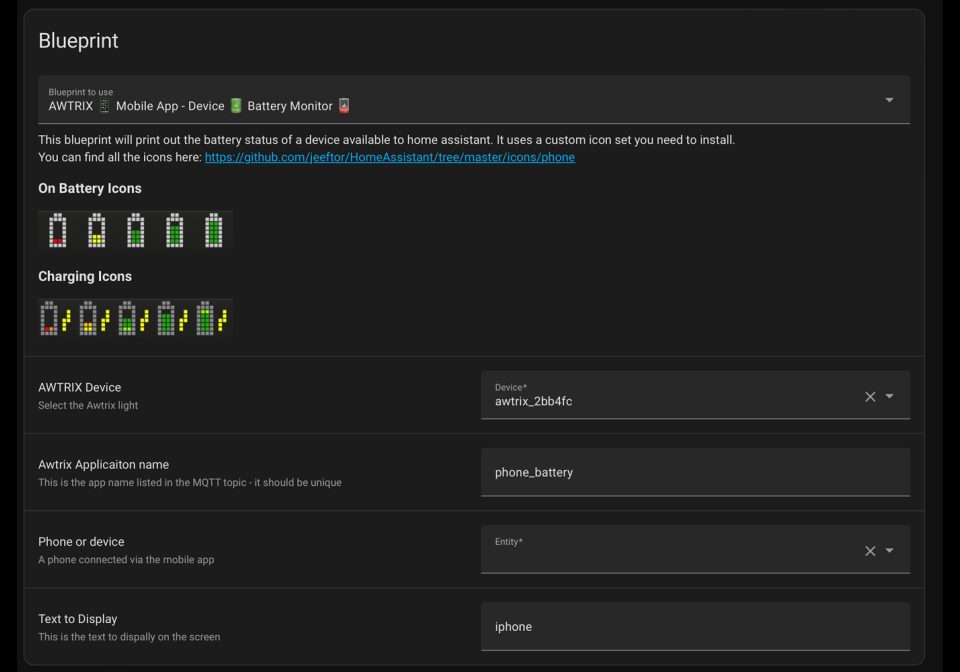
This blueprint will allow you to track and display the status of a mobile (Phone/Ipad/Laptop) device connected to Home Assistant.
When you phone Is plugged in it will use a different icon than when its not.
6wqGQAmP5pe0.yaml
---
blueprint:
name: AWTRIX 📱️ Mobile App - Device 🔋️ Battery Monitor 🪫️
description: >
This blueprint will print out the battery status of a device available to home assistant.
It uses a custom icon set you need to install.
You can find all the icons here: https://github.com/jeeftor/HomeAssistant/tree/master/icons/phone
### On Battery Icons

### Charging Icons

domain: automation
input:
awtrix:
name: AWTRIX Device
description: Select the Awtrix light
selector:
device:
integration: mqtt
manufacturer: Blueforcer
model: AWTRIX Light
multiple: true
app_name:
name: Awtrix Applicaiton name
description: This is the app name listed in the MQTT topic - it should be unique
selector:
text:
default: phone_battery
battery:
name: Phone or device
description: A phone connected via the mobile app
selector:
entity:
multiple: false
filter:
- integration: mobile_app
device_class: battery
# multiple: false
message_text:
name: Text to Display
description: This is the text to dispally on the screen
selector:
text:
default: iphone
push_icon:
name: Icon Mode
description: >
Please select the pushIcon setting for the icon
- `0` Icon doesn't move
- `1` Icon moves with text and will not appear again
- `2` Icon moves with text but appears again when the text starts to scroll again
selector:
select:
options:
- label: Icon doesn't move (default)
value: "0"
- label: Icon moves with text and will not appear again
value: "1"
- label: Icon moves with text but appears again when the text starts to scroll again
value: "2"
mode: restart
variables:
device_ids: !input awtrix
devices_topics: >-
{%- macro get_device_topic(device_id) %}
{{ states((device_entities(device_id) | select('search','device_topic') | list)[0]) }}
{%- endmacro %}
{%- set ns = namespace(devices=[]) %}
{%- for device_id in device_ids %}
{%- set device=get_device_topic(device_id)|replace(' ','') %}
{% set ns.devices = ns.devices + [ device ~ '/custom/jeef_weather'] %}
{%- endfor %}
{{ ns.devices }}
app: !input app_name
battery_sensor: !input battery
base_icon: "{{states[battery_sensor] }}"
message_text: !input message_text
push_icon: !input push_icon
payload: >-
{"icon":"{{ states[battery_sensor].attributes.icon
| replace('mdi:','')
| replace('90','80')
| replace('70','60')
| replace('50','40')
| replace('30','20')}}",
"text":"{{message_text}}",
"pushIcon":{{push_icon}},
"progress":"{{states[battery_sensor].state}}","pushIcon":1}
trigger:
- platform: time_pattern
minutes: /1
condition: []
action:
- repeat:
for_each: "{{ devices_topics }}"
sequence:
- service: mqtt.publish
data:
qos: 0
retain: false
topic: "{{ repeat.item }}"
payload: >
{{payload}}
This flow uses the following icons. Add them to your AWTRIX along with the flow.
8×8 px
8×8 px
8×8 px
8×8 px
8×8 px
8×8 px
8×8 px
8×8 px
8×8 px
8×8 px
Sign in to download these icons or send them to your AWTRIX.
Discussion 0
Ask a question, suggest a change or share how you use it.
No comments yet. Start the conversation.
More flows for Home Assistant Blueprint or Smarthome
Something wrong with this flow? Report it.
Have an idea?
Sign in to ask questions and join the conversation.