Home Assistant Phone charging automation
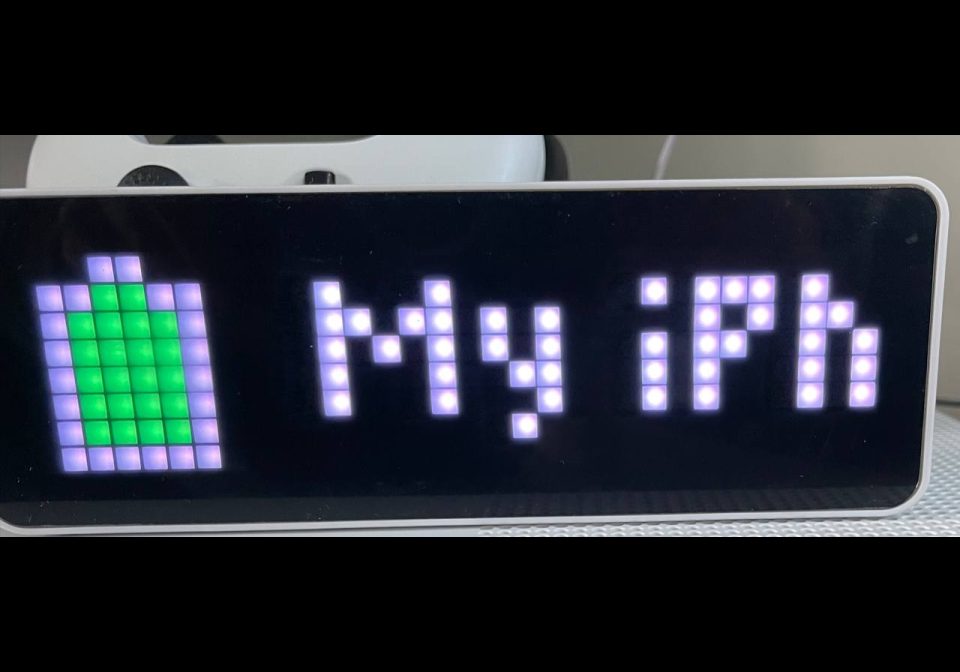
Phone charging state and the battery %
About this flow
| System | Home Assistant |
|---|---|
| AWTRIX version | AWTRIX 3 |
| Topic | Smarthome |
| Built by | Sevagjb |
| File | 6wq2N5Nlo7KV.yaml · 2.3 KB |
| Icons | 3 |
| Published | 20 May 2023 · updated 24 May 2023 |
| Downloads | 57 |
Is this your flow?
If you created this flow, open your saved edit link to add it to your account. You can then manage it whenever you sign in. Adding it to your account replaces the edit link.
Flow description
when you start charging it will publish the state and the battery %
when your phone battery is below 40% will trigger to publish
when the battery is full,
Copy and paste the Yaml code into the automation
only you have to change the phone sensor as this:
-sensor.iphone_battery_state
-sensor.iphone_battery_level
you can change the time pattern, the battery threshold (40%) and the text as you like.
enjoyed
:)
6wq2N5Nlo7KV.yaml
alias: ""
description: ""
trigger:
- platform: time_pattern
minutes: /7
- platform: state
entity_id:
- sensor.iphone_battery_state
to: Charging
condition: []
action:
- choose:
- conditions:
- condition: template
value_template: |-
{% if states('sensor.iphone_battery_level' ) |float <40 %}
true
{%- endif %}
sequence:
- service: mqtt.publish
data:
payload: &amp;amp;amp;amp;gt;-
{"text":"My iPhone is {{ states("sensor.iphone_battery_state")
}} {{ states('sensor.iphone_battery_level', "state" ,
'unit_of_measurement' ) }} ","icon":"12832","color":
"#b93232","pushIcon":2,"repeat":3,"textCase":2,"textOffset":33}
topic: awtrix_light/notify
alias: " MQTT: Publish Reed"
- conditions:
- condition: template
value_template: |-
{% if states("sensor.iphone_battery_state") =="Charging" -%}
true
{%- endif %}
sequence:
- service: mqtt.publish
data:
payload: &amp;amp;amp;amp;gt;-
{"text":"My iPhone is {{ states("sensor.iphone_battery_state")
}} {{ states('sensor.iphone_battery_level', "state" ,
'unit_of_measurement' ) }}
","icon":"1095","pushIcon":2,"repeat":3,"textCase":2,"textOffset":33}
topic: awtrix_light/notify
alias: " MQTT: Publish White"
- conditions:
- condition: template
value_template: |-
{% if states("sensor.iphone_battery_state") =="Full" -%}
true
{%- endif %}
sequence:
- service: mqtt.publish
data:
payload: &amp;amp;amp;amp;gt;-
{"text":"My iPhone is {{ states("sensor.iphone_battery_state")
}} {{ states('sensor.iphone_battery_level', "state" ,
'unit_of_measurement' ) }} ","icon":"12126","color":
"##22aa13","pushIcon":2,"repeat":3,"textCase":2,"textOffset":33}
topic: awtrix_light/notify
alias: " MQTT: Publish Green"
mode: single
This flow uses the following icons. Add them to your AWTRIX along with the flow.
8×8 px
8×8 px
8×8 px
Sign in to download these icons or send them to your AWTRIX.
Discussion 0
Ask a question, suggest a change or share how you use it.
No comments yet. Start the conversation.
More flows for Home Assistant or Smarthome
Something wrong with this flow? Report it.
Have an idea?
Sign in to ask questions and join the conversation.