Birthdays
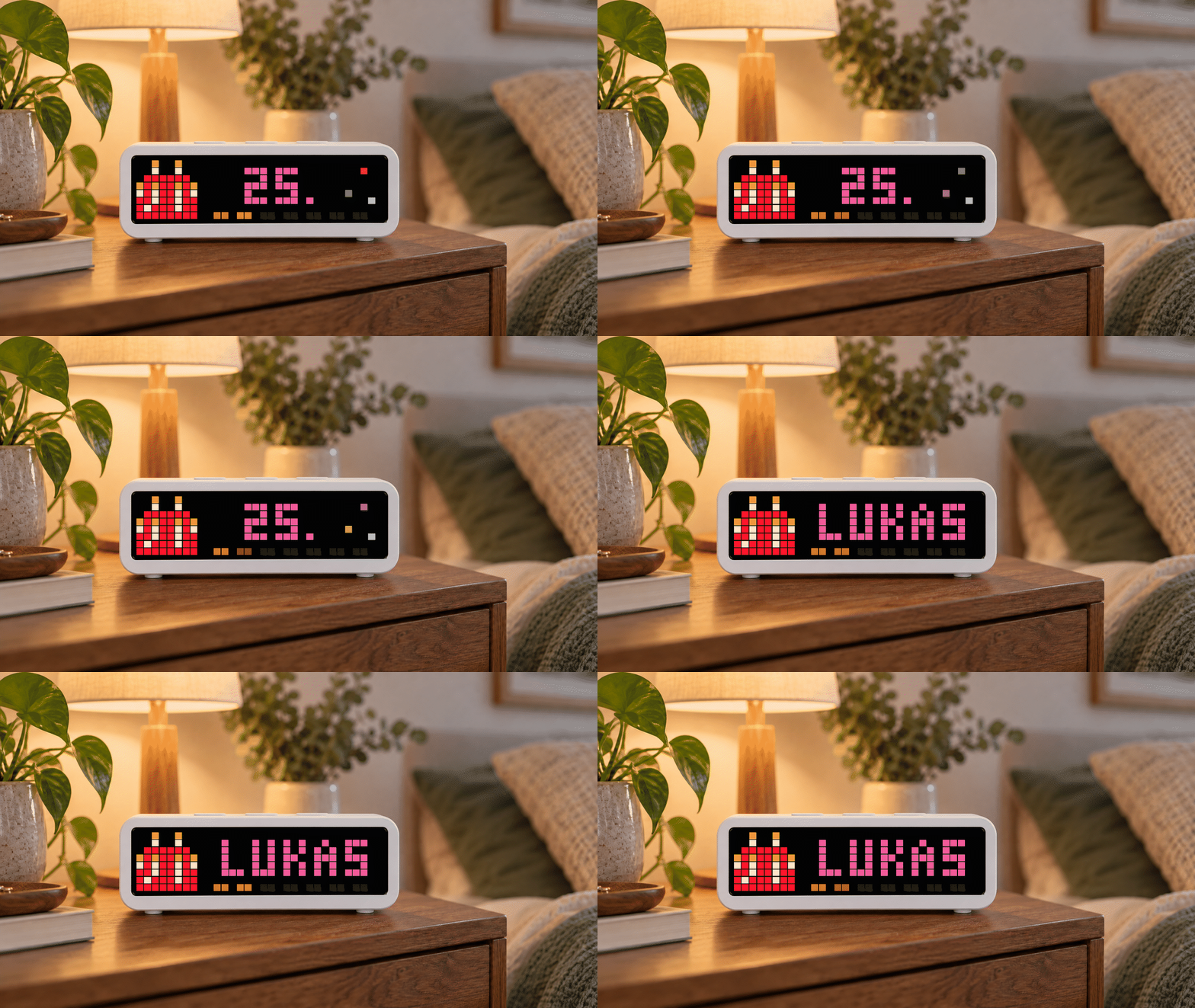
On your display
Shows upcoming birthdays with age, cake, countdown bar and optional rainbow text.
- Works with
- AWTRIX NG
- Topic
- Social
- Includes
- Script
Choose your display in the next step.
Flow description
Birthdays for AWTRIX NG 🎂
Never miss an important birthday again.
Birthdays turns your AWTRIX NG into a colorful birthday reminder. It shows the birthday cake, the age the person will turn and an animated seven-day countdown. Afterwards, the name appears clearly on the full display — with an optional rainbow celebration on the big day. 🌈
Features
- 🎂 Colorful birthday cake with a built-in fallback graphic
- 🔢 Shows the age the person will turn
- 📅 Upcoming birthdays appear up to 30 days in advance
- ⏳ Animated seven-segment countdown bar
- ✨ Decorative sparkle animation during the age intro
- 🏷️ Clear name display with scrolling for longer names
- 🌈 Optional rainbow animation on the birthday
- 🇩🇪🇬🇧 German and English app settings
- 🗓️ Configurable handling of 29 February in non-leap years
- 📝 Browser-based birthday editor with JSON and CSV import
- 💾 JSON backup and ready-to-use Berry module export
- 🔒 Birthday data stays in your browser and on your AWTRIX
- 📡 No server, cloud account or external API required
Setup
The Hub installs the main app script. Your personal birthday list is stored separately in a local AWTRIX module named birthday_data.
- Open the AWTRIX Birthday Editor.
- Add birthdays manually or import a JSON/CSV file.
- Download the generated
birthday_data.berrymodule. - In the AWTRIX NG web interface, open Scripts → Modules, create a module named
birthday_data, paste the file contents and save it. - Install or reload Birthdays from the Hub.
The hosted editor cannot reliably send data directly to a local HTTP device from an HTTPS page. For direct transfer, download the offline editor from the page and run it locally. Manual module installation always remains available.
Privacy
Names and dates are processed locally in your browser. They are not uploaded to the editor, this repository or an external service. 🔐
Birthdays are worth remembering — passwords are not. 😉🎉
6wox2Gx3BYKn.ax
# @name    Birthdays
# @desc    Birthday cake, upcoming age, persistent countdown and name
# @author  Roy
# @version 4.6.1
# Uses the locally installed icon 7020; no Hub installation requested.
# @config  sparkle     bool   "Lichtpunkte beim Auftakt" default=true
# @config  language    select "Sprache" default=de options=de,en
# @config  text_color  color  "Standardfarbe" default=#FF66AA
# @config  rainbow     bool   "Regenbogen am Geburtstag" default=true
# @config  days_before number "Countdown vorher" default=7 min=1 max=30 unit=Tage
# @config  leap_day    select "29. Februar in Normaljahren" default=feb28 options=feb28,mar1

import birthday_data
import string

class Birthdays
  var entries, language, color, rainbow, days_before, leap_day
  var label, last_date, days_left, birthday_today
  var age_label, shown_at, bar_color, segments, lit_segments, name_ms
  var sparkle

  def init()
    self.entries = birthday_data.entries
    self.language = store.get("language")
    self.color = store.get("text_color")
    if self.color == nil self.color = settings.get("textColor") end
    self.rainbow = store.get("rainbow")
    self.sparkle = store.get("sparkle")
    self.days_before = store.get("days_before")
    self.leap_day = store.get("leap_day")
    self.label = nil
    self.last_date = -1
    self.days_left = 999
    self.birthday_today = false
    self.age_label = ""
    self.shown_at = 0
    self.bar_color = 0x3399FF
    self.segments = 7
    self.lit_segments = 0
    self.name_ms = 3000
  end

  def loop()
    if year() < 0 return end
    var date_key = year() * 10000 + month() * 100 + day()
    if date_key == self.last_date return end
    self.last_date = date_key

    var cy = year()
    var leap = cy % 4 == 0 && (cy % 100 != 0 || cy % 400 == 0)
    var md = [31, leap ? 29 : 28, 31, 30, 31, 30, 31, 31, 30, 31, 30, 31]
    var today = day()
    if month() > 1
      for i : 0 .. month() - 2 today += md[i] end
    end
    var year_days = leap ? 366 : 365
    var nearest = 367
    var nearest_name = nil
    var nearest_birth_year = 0
    var nearest_target_year = cy

    for item : self.entries
      if isinstance(item, list) && size(item) >= 4
        var name = item[0]
        var by = num(item[1])
        var bm = num(item[2])
        var bd = num(item[3])
        if type(name) == "string" && name != "" && by != nil && bm != nil && bd != nil &&
           by >= 1 && by <= cy && bm >= 1 && bm <= 12 && bd >= 1 && bd <= 31
          var target_day = bd
          var target_month = bm
          if bm == 2 && bd == 29 && !leap
            target_day = self.leap_day == "mar1" ? 1 : 28
            target_month = self.leap_day == "mar1" ? 3 : 2
          end
          if target_day <= md[target_month - 1]
            var birthday = target_day
            if target_month > 1
              for i : 0 .. target_month - 2 birthday += md[i] end
            end
            var remaining = birthday - today
            var target_year = cy
            if remaining < 0
              target_year += 1
              var next_leap = target_year % 4 == 0 &&
                              (target_year % 100 != 0 || target_year % 400 == 0)
              var next_md = [31, next_leap ? 29 : 28, 31, 30, 31, 30, 31, 31, 30, 31, 30, 31]
              target_day = bd
              target_month = bm
              if bm == 2 && bd == 29 && !next_leap
                target_day = self.leap_day == "mar1" ? 1 : 28
                target_month = self.leap_day == "mar1" ? 3 : 2
              end
              birthday = target_day
              if target_month > 1
                for i : 0 .. target_month - 2 birthday += next_md[i] end
              end
              remaining = year_days - today + birthday
            end
            if remaining < nearest
              nearest = remaining
              nearest_name = name
              nearest_birth_year = by
              nearest_target_year = target_year
            end
          end
        end
      end
    end

    self.label = nil
    self.days_left = nearest
    self.birthday_today = nearest == 0
    if nearest_name == nil || nearest > self.days_before return end
    var age = nearest_target_year - nearest_birth_year
    self.age_label = str(age) + "."
    # Seven daily segments with the default window. Wider windows are scaled
    # to seven segments; the following message always gives the exact days.
    self.segments = min(7, self.days_before)
    self.lit_segments = int((nearest * self.segments + self.days_before - 1) / self.days_before)
    self.bar_color = nearest <= 2 ? 0xFF8800 : (nearest <= 4 ? 0xFFDD00 : 0x3399FF)
    self.label = string.toupper(nearest_name)
    font("small")
    var name_width = text_width(self.label)
    font("small")
    if name_width > width() - 9
      self.name_ms = 600 + int((name_width + width() - 9) * 1000 / 21)
    else
      self.name_ms = 3000
    end
  end

  def should_show()
    self.loop()
    return self.label != nil && self.days_left <= self.days_before
  end

  def on_show()
    self.shown_at = now_ms()
  end

  def duration()
    return 2 * (3000 + self.name_ms)
  end

  def draw_counter(elapsed)
    if self.birthday_today
      for i : 9 .. width() - 1
        pixel(i, 7, self.rainbow ? hsv((i * 18 + elapsed / 15) % 360, 100, 100) : self.color)
      end
      return
    end
    var sw = int((width() - 9) / self.segments)
    var start = 9 + int((width() - 9 - (sw * self.segments - 1)) / 2)
    var pulse = int(elapsed % 1600)
    if pulse > 800 pulse = 1600 - pulse end
    var glow = 55 + int(pulse * 45 / 800)
    for i : 0 .. self.segments - 1
      var c = self.bar_color
      if i == self.lit_segments - 1
        c = hsv(self.days_left <= 2 ? 32 : (self.days_left <= 4 ? 52 : 210), 100, glow)
      end
      rect_fill(start + i * sw, 7, sw - 1, 1, i < self.lit_segments ? c : 0x181818)
    end
  end

  def draw()
    clear()
    if self.label == nil return end
    font("small")
    var elapsed = now_ms() - self.shown_at
    var phase = elapsed % (3000 + self.name_ms)
    if !icon("7020", 0, 0)
      rect_fill(1, 3, 6, 3, 0xFF66AA)
      line(1, 3, 6, 3, 0xFFF0DD)
      pixel(3, 1, 0xFFAA22)
    end
    self.draw_counter(elapsed)
    if phase < 3000
      var x = min(width() - text_ink_width(self.age_label),
                  max(9, int((width() - text_ink_width(self.age_label)) / 2)) + 1)
      if self.birthday_today && self.rainbow
        ramp_text(x, 6, self.age_label, "Rainbow", 0, 0.5)
      else
        text(x, 6, self.age_label, self.color)
      end
      if self.sparkle && x + text_ink_width(self.age_label) < width() - 6
        var tick = int(phase / 500)
        pixel(width() - 3, 1, hsv((tick * 70) % 360, 80, 100))
        pixel(width() - 5, 4, hsv((tick * 70 + 140) % 360, 70, 85))
        if tick % 2 == 0 pixel(width() - 2, 5, 0x88CCFF) end
      end
      return
    end
    font("small")
    var w = text_ink_width(self.label)
    var x = 9 + int((width() - 9 - w) / 2)
    if w > width() - 9
      var travel = max(0, int((phase - 3300) * 21 / 1000))
      x = max(9 - w, width() - travel)
    end
    if self.birthday_today && self.rainbow
      ramp_text(x, 6, self.label, "Rainbow", 0, 0.5)
    else
      text(x, 6, self.label, self.color)
    end
    # Keep the cake and counter intact while a long name crosses their area.
    icon("7020", 0, 0)
    self.draw_counter(elapsed)
  end
end

return Birthdays()Discussion 0
Ask a question, suggest a change or share how you use it.
No comments yet. Start the conversation.
More flows for AWTRIX NG Scripts or Social
Something wrong with this flow? Report it.
Have an idea?
Sign in to ask questions and join the conversation.